Shared guide

How to set user roles and permissions

This how-to guide walks you through the straightforward process of setting user roles and permissions in your system.

victoriaworkflowsvictoriaworkflows
·13 steps·80 views·Published

This how-to guide walks you through the straightforward process of setting user roles and permissions in your system. Follow the outlined steps to manage user access efficiently, ensuring proper roles are assigned for effective collaboration.

Step-by-step Guide13 steps
  1. Click VA

    Click VA
    Loading screenshot…
    100%
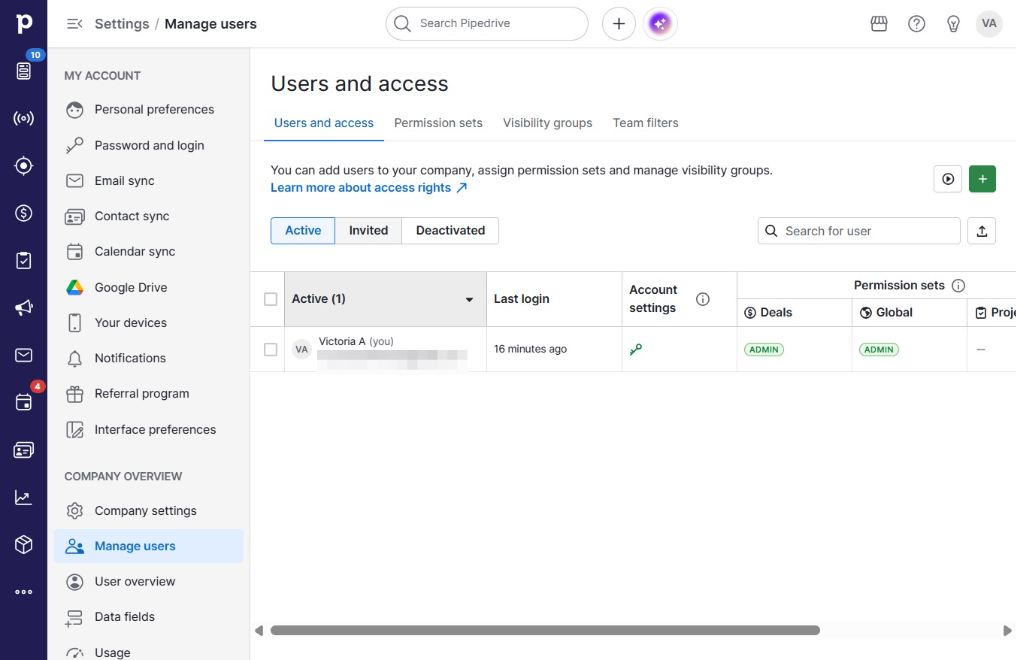
  2. Click Manage users

    Click Manage users
    Loading screenshot…
    100%
  3. Click Invited

    Click Invited
    Loading screenshot…
    100%
  4. Click on "Click here."

    Click on "Click here."
    Loading screenshot…
    100%
  5. Click Edit access rights

    Click Edit access rights
    Loading screenshot…
    100%
  6. Click on "Click here."

    Click on "Click here."
    Loading screenshot…
    100%
  7. Click Deals regular user

    Click Deals regular user
    Loading screenshot…
    100%
  8. Click Deals admin

    Click Deals admin
    Loading screenshot…
    100%
  9. Click Global regular user

    Click Global regular user
    Loading screenshot…
    100%
  10. Click Global admin

    Click Global admin
    Loading screenshot…
    100%
  11. Click on "Click here."

    Click on "Click here."
    Loading screenshot…
    100%
  12. Click Edit 1 user

    Click Edit 1 user
    Loading screenshot…
    100%
  13. Click Confirm

    Click Confirm
    Loading screenshot…
    100%