Shared guide

How to assign user licenses

In this concise guide, you'll learn the straightforward process of assigning user licenses through the Admin Portal.

victoriaworkflowsvictoriaworkflows
·8 steps·47 views·Published

In this concise guide, you'll learn the straightforward process of assigning user licenses through the Admin Portal. Follow a step-by-step approach to manage active users and update their licenses effectively.

Step-by-step Guide8 steps
  1. Click 

    Click 
    Loading screenshot…
    100%
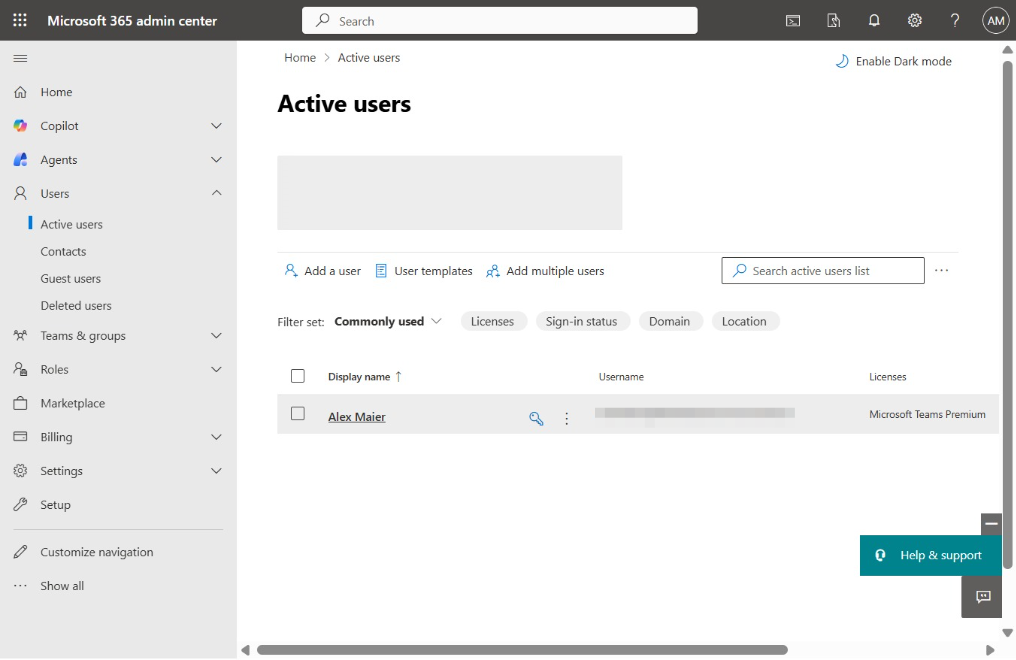
  2. Click Active users

    Click Active users
    Loading screenshot…
    100%
  3. Click Alex Maier

    Click Alex Maier
    Loading screenshot…
    100%
  4. Click Licenses and apps

    Click Licenses and apps
    Loading screenshot…
    100%
  5. Click 

    Click 
    Loading screenshot…
    100%
  6. Click 

    Click 
    Loading screenshot…
    100%
  7. Click Save changes

    Click Save changes
    Loading screenshot…
    100%
  8. Click 

    Click 
    Loading screenshot…
    100%